White-labeling is what makes GoHighLevel feel like your software instead of someone else's. Your logo, your login domain, your branded emails: on the surfaces GoHighLevel lets you rebrand, clients see your brand instead of GoHighLevel's. It's the difference between reselling a tool and selling a product with your name on it. This guide is the full setup, and it's part of our complete GoHighLevel white-label & SaaS agency guide.
I white-labeled my own agency account, so everything below is the real setup, screenshot from my live account (my specifics blacked out for privacy).
This page has affiliate links; if you start a trial through one we may earn a commission at no cost to you. I only write about features I actually use.
Where white-label lives: Settings → Company → Whitelabel
Everything starts in Settings → Company → Whitelabel. The first thing to set is your logo — upload it and it replaces GoHighLevel's branding across the interface your clients see.
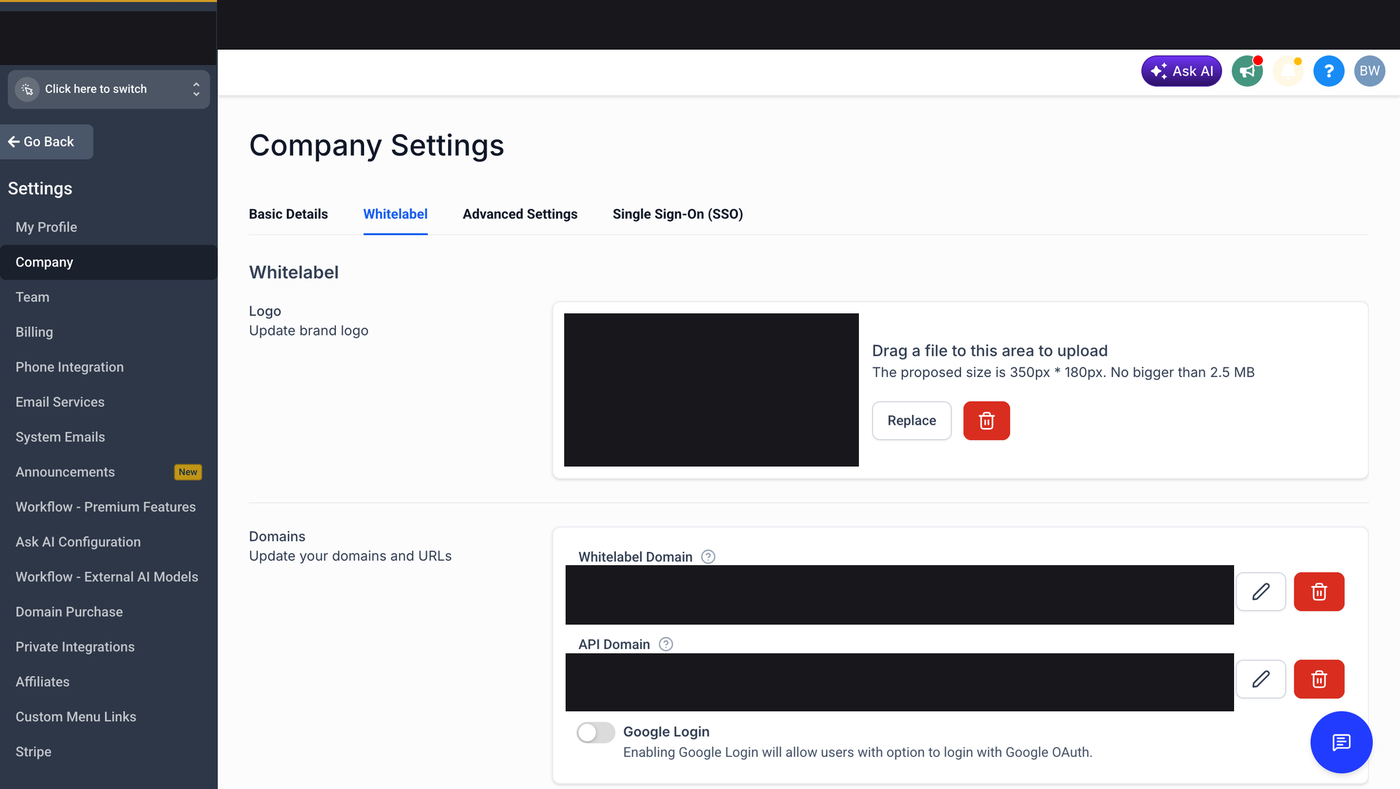
The logo is the easy part. The domain is where people get stuck.
The custom domain — the step that trips people up
Out of the box, your clients log in at a GoHighLevel URL. To put them on your domain (something like app.youragency.com), you point a subdomain you own at GoHighLevel with a CNAME DNS record, then enter that subdomain in the Whitelabel Domain field.
The order matters: create the CNAME first, let it resolve, then set the domain in GoHighLevel. If you type the domain in before the DNS record has propagated, the field rejects it and you assume it's broken. It isn't — DNS just hasn't caught up. Give it time (sometimes up to an hour) and try again. This is a plan-independent feature — connecting custom domains works across GoHighLevel plans, not just the top tier.
White-label emails and shared templates
Branding shouldn't stop at the dashboard. Two things keep client-facing email on-brand:
- System emails — the notifications GoHighLevel sends can carry your branding instead of theirs, so client-facing messages read as yours on the surfaces GoHighLevel lets you rebrand.
- Shared email templates — build a branded template once at the agency level and share it down to your sub-accounts, so every client starts from your design instead of a blank editor. It saves rebuilding the same template per client and keeps everything consistent.
This is built into GoHighLevel. Try it free for 30 days →
Controlling GoHighLevel's in-app banners
GoHighLevel pushes its own feature announcements and promotional banners into every sub-account. Left alone, your clients' dashboards fill up with messages advertising the platform underneath your brand — which defeats the point of white-labeling. From Agency Settings you can review and manage which of these banners appear, so the workspace your client logs into stays yours, not GoHighLevel's.
The white-label mobile app
A fully branded mobile app — your name and icon in the App Store and Google Play, not GoHighLevel's — is the most advanced piece of white-labeling. It's a higher-tier / paid add-on feature rather than something on the standard Agency Pro plan, so check current GoHighLevel pricing before you promise a client an app-store listing. Once it's set up, you push updates (bug fixes, new features, branding changes) out to your branded app the same way any app publisher does — through the App Store and Play Store release process.
After branding: structure your clients
White-label makes the platform look like yours. The next piece is keeping each client walled off and spinning them up fast — see our guide to GoHighLevel sub-accounts and snapshots, then the full agency guide for how white-label, SaaS Mode, and reselling fit together.
Frequently asked questions
Can you white-label GoHighLevel on any plan?
Core white-labeling — your logo and a custom login domain — is available across GoHighLevel plans, not just the top tier. The fully branded mobile app is the exception: it's a higher-tier or paid add-on. Confirm current details on GoHighLevel's pricing page.
How do I white-label the GoHighLevel login domain?
Point a subdomain you own (like app.youragency.com) at GoHighLevel with a CNAME DNS record, wait for it to resolve, then enter that subdomain in Settings → Company → Whitelabel. Create the DNS record first — the field rejects a domain that hasn't propagated yet.
Will my clients ever see the GoHighLevel name?
On the surfaces GoHighLevel lets you rebrand — the dashboard, your custom domain, branded emails, and controlled in-app banners — clients see your brand. White-labeling covers the client-facing experience; set the logo, domain, emails, and banner controls and the platform reads as yours.
Does white-labeling cost extra?
Logo and custom-domain white-labeling come with the agency plans. The branded mobile app is a separate paid add-on / higher tier. Check GoHighLevel's current pricing before committing a client to a mobile app.
Keep learning: all agency, white-label & saas how-tos.