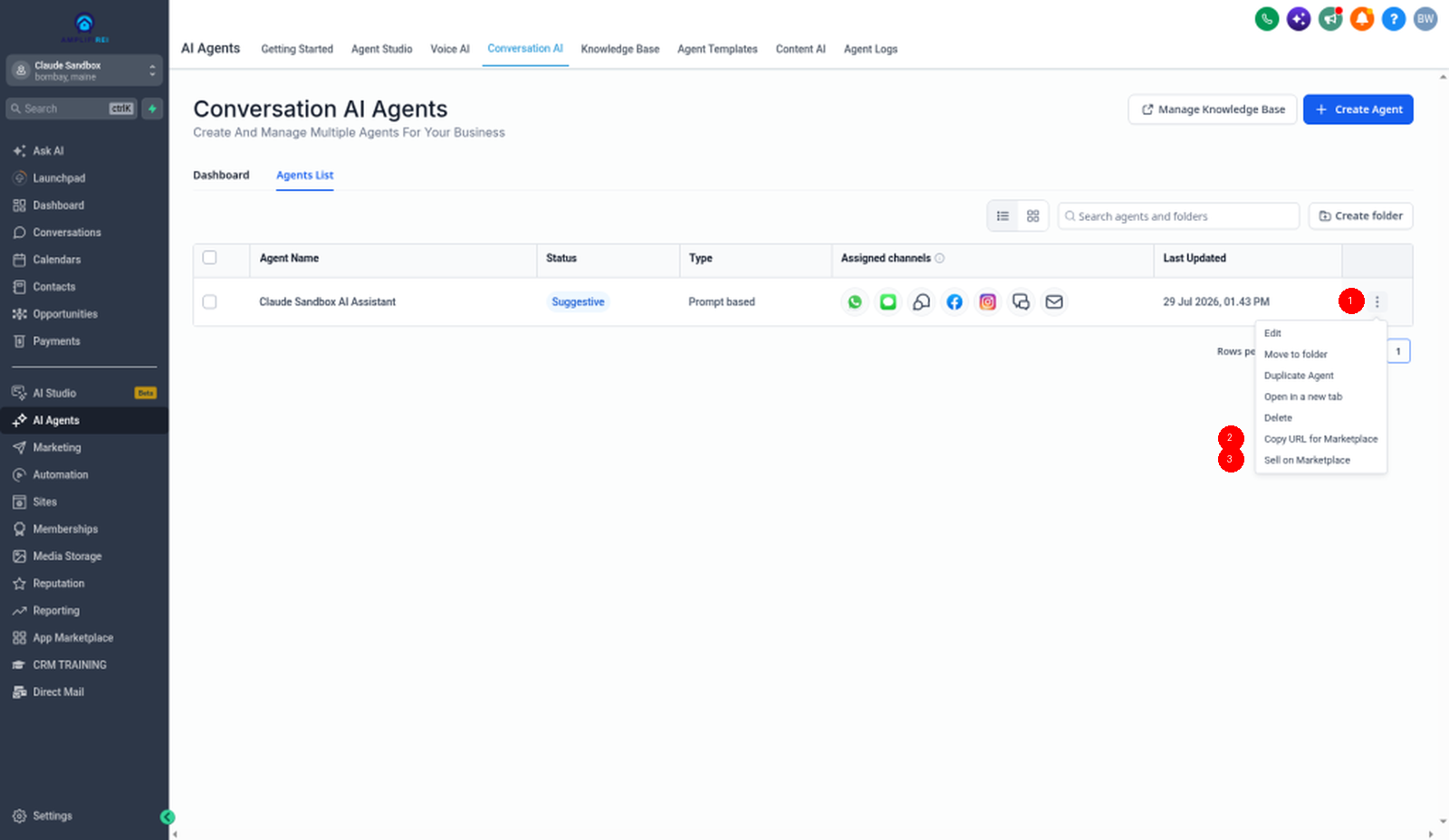
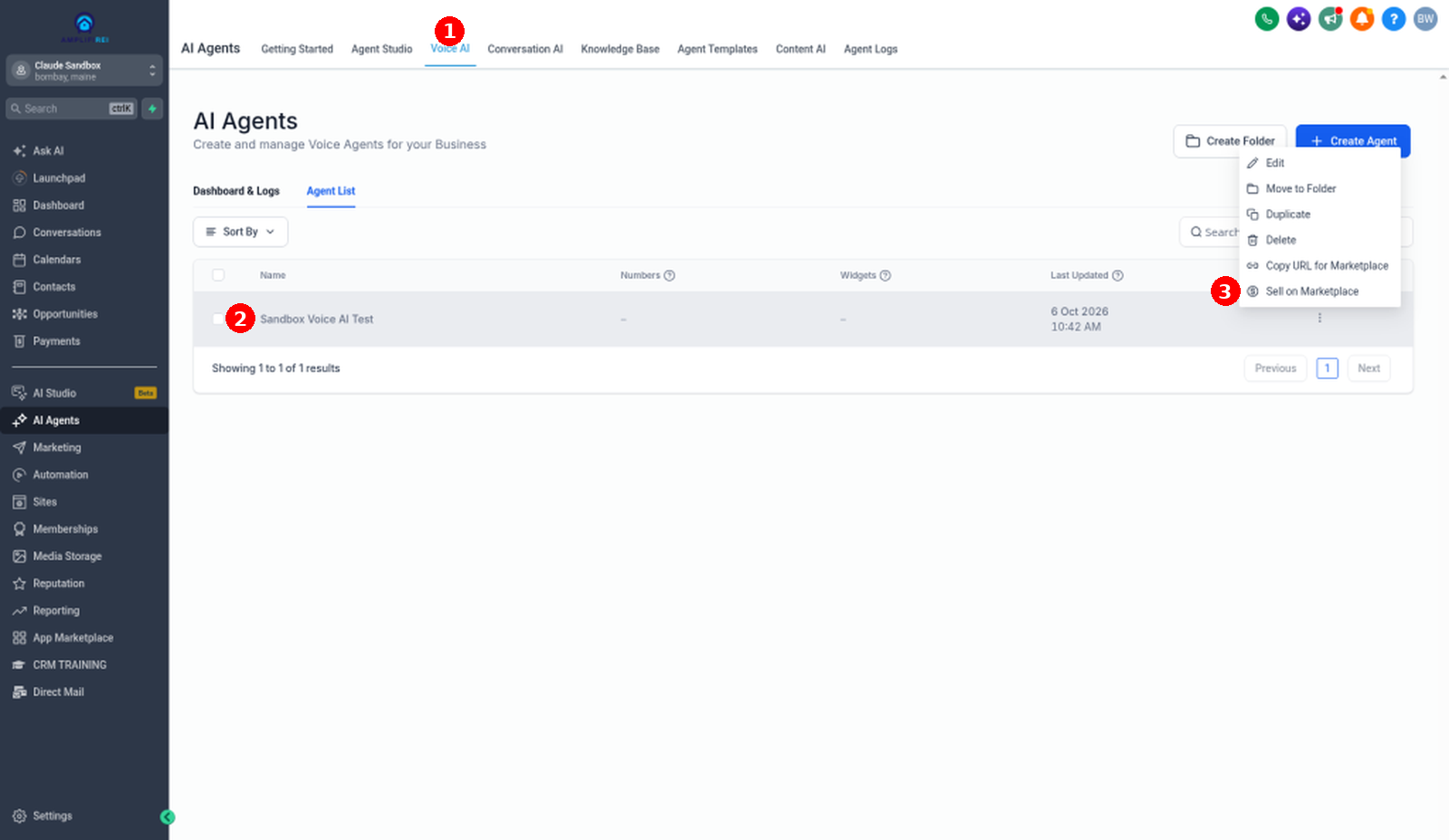
In HighLevel, open Conversation AI or Voice AI, pick the agent, and choose the sell option (Sell on Marketplace in HighLevel's screenshots). Only Agency Owners and Admins can see it. That sends you to the Developer Portal with a link that carries the agent's package. There, go to Modules → Conversation AI (or Voice AI), paste the link, click Submit, and edit the listing fields. Fill out Basic Info, App Profile, Pricing, and Support, then submit it for review.
Already live? You can't edit the template on the Live version. Clone it to a Draft under Manage → Versions, make the change, and publish with the right version bump.
Before you start: who can do this
Can see the sell option
Agency Owners and Admins can see the sell option on the Conversation AI and Voice AI pages.
Sub-account admins and users
Sub-account admins and users don't see this option. If it's missing for you, check your role before anything else.
The listing workflow
Part 1: Generate the Marketplace link
Open the agent and choose the sell option
In HighLevel, go to the Conversation AI or Voice AI page, select the agent you want to sell, and choose the sell option.
Cloud Sandbox (2026-10-06) shows Sell on Marketplace and Copy URL for Marketplace. Help-center body text still says Sell this Template/Agent on Marketplace / Copy Link for Marketplace — use the live menu labels.
Decide what ships with the agent
Spell out what ships with your agent, so buyers know what installs automatically and what they'll set up after they install it.
The template includes more than prompts. It also brings the agent's actions, like triggering a workflow or creating an appointment, plus the assets behind them: workflows, calendars, custom fields and values, and so on. You're selling the whole package.
- Prompts
- Actions (for example, trigger a workflow or create an appointment)
- Workflows
- Calendars
- Custom fields and custom values
- Knowledge Base, only if you choose Include
Assets you imported as part of an IP-protected snapshot. HighLevel says restricted or IP-protected assets can't be included in AI agents. Check where each workflow, calendar, and field came from before you package the agent.
Include or Exclude the Knowledge Base
While publishing, you choose whether to Include or Exclude the agent's Knowledge Base. If you include it, the Knowledge Base is bundled with the agent and installs automatically for the buyer.
To publish without a bundled Knowledge Base, set Knowledge Base to Exclude on the Publish screen.
Land in the Developer Portal
HighLevel sends you to the Developer Portal with a special link that carries your bot's package.
Part 2: Complete your app details in the Developer Portal
Paste the link under Modules and click Submit
In the Developer Portal, go to Modules → Conversation AI or Voice AI, paste your link, and click Submit to pull in the agent's details.
Edit what buyers will read, and review what you can't change
Once the details load, here's what you can and can't change on the listing:
| Field | Editable? | What it means for buyers |
|---|---|---|
| Use cases | Yes | For example, lead qualification or appointment booking. |
| Agent description | Yes | Suggested wording: explain what the agent does and what ships with it. |
| Available actions | Yes | For example, workflows, appointments, SMS blasts, and call transfers. |
| Suggested questions | Yes | Questions buyers can ask the agent while they test it on the Marketplace before buying. |
| Supported channels | No (review only) | For example, SMS, email, Instagram, and calls. |
This is built into GoHighLevel. Try it free for 30 days →
Part 3: Finish and submit for review
Fill out the four listing sections
Complete your app's Basic Info, App Profile, Pricing, and Support sections.
Submit for review
Submit the listing for review. Once it's approved, it goes live in the Marketplace for all agency users and sub-accounts.
Part 4: Update a template that's already live
Conversation AI and Voice AI templates now follow the Marketplace's app-versioning workflow. Template changes are tied to app versions, and you can't edit them directly on a Live app version. HighLevel says this gives AI agent updates a clearer release history.
Make the change on the agent and copy the link again
Change the agent on the Conversation AI or Voice AI page, then choose Copy URL for Marketplace from the menu.
Go to Manage → Versions and clone Live as a Draft
In the Developer Portal, open Manage → Versions and clone the Live version as a Draft.
Make the template change in the Draft
Make your Conversation AI or Voice AI template changes in the Draft version. That includes updating the template link you just copied.
Publish the Draft with the right version bump
Publish the Draft with the appropriate version bump. Changes to an existing AI agent template are Minor updates by default. Adding a Conversation AI or Voice AI template to an existing Live app for the first time requires a Major version.
Major vs Minor: which bump to use
| Change (to an existing template unless noted) | Version bump |
|---|---|
| Agent name | Minor (default) |
| Agent description | Minor (default) |
| Use case | Minor (default) |
| Supported channels | Minor (default) |
| Actions | Minor (default) |
| Template configuration | Minor (default) |
| Template link changes | Minor (default) |
| Disabling or re-enabling an existing template link | Minor (default) |
| Adding a Conversation AI or Voice AI template to an existing Live app for the first time | Major (required) |
For example, if a Live app has no Conversation AI or Voice AI template and you add one in a Draft, publish that Draft as a Major version. It adds new module capabilities.
Common mistakes to avoid
- Packaging workflows, calendars, or fields that came from an IP-protected snapshot. They can't be included.
- Looking for the sell option from a sub-account admin or user login. Only Agency Owners and Admins see it.
- Trying to edit the template on the Live version. Clone to a Draft first.
- Publishing a first-time Conversation AI or Voice AI template on an existing Live app as Minor. It needs a Major bump.
- Leaving the Knowledge Base on Include when you don't want buyers to get it. Set it to Exclude.
New to HighLevel? Start with the HighLevel Bootcamp →
FAQ
What assets can a template include?
Workflows, calendars, custom fields, custom values, and an optional Knowledge Base, if the agent's builder chooses Include during publishing.
Can I list my agent without its Knowledge Base?
Yes. On the Publish screen, set Knowledge Base to Exclude to publish without a bundled Knowledge Base.
Why don't I see Sell on Marketplace?
Only Agency Owners and Admins can see it. Sub-account admins and users can't.
Can I edit my template while the app is live?
Not on the Live version. Go to Manage → Versions, clone the Live version as a Draft, make the change there, and publish the Draft with the appropriate version bump.
Does renaming my agent need a Major version?
Renaming an existing AI agent template is a Minor update by default. The same default applies to description, use case, supported channels, actions, template configuration, and template-link changes.
Related guides
- How to use AI agent templates in GoHighLevel
- Test your GoHighLevel Marketplace app
- Track App Marketplace earnings in GoHighLevel
- Snapshot Conversation AI bots